
DeepSeek Harness
新闻
DeepSeek Harness 开发者预览版:一切皆插件 | 微信公众号
使用
npx @deepseek-ai/dsh web
或
# 全局安装
npm -g install @deepseek-ai/dsh
# 运行
dsh web
重要
启动报错:--expose-internals 问题,使用以下命令启动:
node --expose-internals $(which dsh) web
四个模式
标准模式提供完整的工具组合;
PTC 模式通过模型生成的一段代码组合多轮工具调用;
极简模式仅保留一个 shell 工具与一个文件编辑工具,用于最小化环境下的模型基准测试;
创造模式可以检查当前运行时、在内存中试验 Cordis 插件,并据此组合和创作新的模式。
链接
| url | description | remarks |
|---|---|---|
| DeepSeek Harness 开发者预览版:一切皆插件 | DeepSeek Harness 官网 | 官方简称 dsh |
| https://github.com/deepseek-ai/deepseek-harness | dsh 官方Github仓库 | |
| cordiverse/cordis: Meta-Framework of Spatiotemporal Composability | cordis 官方Github仓库 | |
| Cordis 入门 DeepSeek Harness | cordis 官方Github仓库 项目简介中所挂的链接 | 指向 DeepSeek 的 github.io 文档页 由 DeepSeek 编写的最小 Harness 插件开发示例 |
| dsh-plugin · GitHub Topics | 社区插件 |
- DeepSeek Harness 开发指南:deepseek-harness/docs/development.zh.md
- DeepSeek Harness 架构指南:deepseek-harness/docs/architecture.zh.md
- Cordis 入门:Cordis 入门 | DeepSeek Harness
- Cordis 教程:Cordis 教程 | DeepSeek Harness
每一次运行都有迹可循
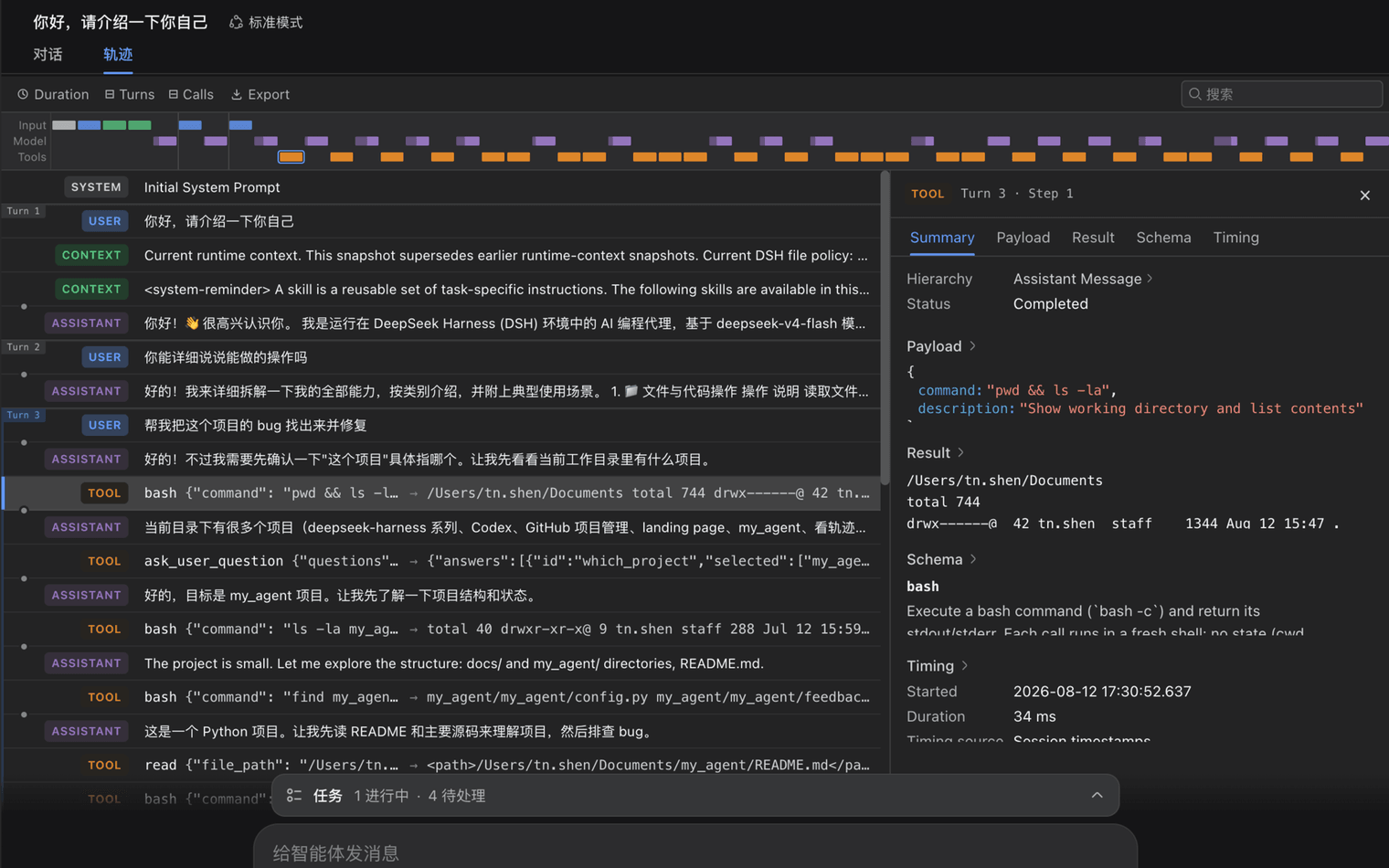
模型看到的一切都会写入仅追加设计的会话日志,包括系统提示词、思维链、工具调用与结果、子 Agent 调度,以及每一次上下文注入。在 Trajectory 视图中,你可以按来源查看这些信息。恢复、分叉、检索与回放也共享同一份事件流。
插件
安装
# 已经安装了 dsh
dsh plugin --profile web add <package-name>[@version]
# 未安装 dsh 时
npx -y --package @deepseek-ai/dsh dsh plugin --profile web add <package-name>[@version]
package-name: 包名version: 版本号(可选)
提示
插件安装在: C:\Users\pc\.dsh\profiles\web\node_modules
其他命令
# 已安装插件列表(第三方)
dsh plugin --profile web list

# 卸载
dsh plugin --profile web remove <package-name>

# 查看当前所有的插件(包括官方)
dsh web --dump-config [ | grep <关键字>]
dsh web --dump-config [ | findstr <关键字>]
WebUI 美化
鲸鱼娘皮肤系列(深海女仆工坊):Small-tailqwq/dsh-deep-whale
手绘悬浮鲸鱼:lhh010/dsh-ui-whale
QQ2006:LaplaceYoung/dsh-qq2006
gov网站风格,不过插件是另起3081端口和dsh web的3080进行交互,可以使用这个项目来研究另起端口的方式:ExElectron/dsh-gov-portal
工具
基于md文件的工作流编辑器(并不是工作流运行器):kanghelyu/dsh-deepseek-flow
可撤销 write / edit 两个工具所做的更改:QinLuza/dsh-file-undo
在规划与实现的过程中,agent 会先主动检索 AIGC Radar 精选项目库:Kaixxrua/dsh-aigc-radar
余额监控与提醒 + 充值入口:feibi-mochi/deepseek-harness-control-center
自定义API厂商
如果需要模型支持图片输入,自定义厂商之后,需要更改 ~/.dsh/settings.yaml 添加 input:
llm-pi-ai:
  providers:
    deepseek:
      baseURL: https://api.commandcode.ai/provider/v1
      models:
        - id: deepseek/deepseek-v4.1-flash
          name: V4.1 Flash
          maxTokens: 256000
          contextWindow: 1000000
          input:
            - text
            - image
      apiKeyEnv: COMMAND_CODE_GOAT_API_KEY
更新0.1.7-rc.2:~/.dsh/cordis.patch.yml
- id: llm-pi-ai
  name: "@deepseek-ai/dsh-llm-pi-ai"
  config:
    providers:
      command-go-goat:
        displayName: Command Go GOAT
        apiKeyEnv: COMMAND_CODE_GOAT_API_KEY
        api: openai-responses
        baseURL: https://api.commandcode.ai/provider/v1
        models:
          - id: deepseek/deepseek-v4.1-flash
            name: DeepSeek V4.1 Flash
            contextWindow: 1000000
            maxTokens: 32000
            input:
              - text
              - image
            reasoningEfforts:
              low: low
              high: high
              max: max
TEMP
cd D:\WorkSpace\AI\deepseek-harness
$env:DSH_HOME = "D:\WorkSpace\AI\deepseek-harness-plugins\.dsh-test"
pnpm dsh web --port 3199
OpenCode V2
这里示例定义了两个提供商
{
  "$schema": "https://opencode.ai/config.json",
  "provider": {
    "RawChat": {
      "npm": "@ai-sdk/openai-compatible",
      "name": "RawChat",
      "options": {
        "baseURL": "https://new.sharedchat.cc/codex",
        "apiKey": "sk-xxx"
      },
      "models": {
        "gpt-5.5": {
          "name": "gpt-5.5"
        }
      }
    },
    "commandcode-goat": {
      "npm": "@ai-sdk/openai",
      "name": "Command Code GOAT",
      "options": {
        "baseURL": "https://api.commandcode.ai/provider/v1",
        "apiKey": "user_xxx"
      },
      "models": {
        "deepseek/deepseek-v4.1-flash": {
          "name": "DeepSeek V4.1 Flash",
          // 思考
          "reasoning": true,
          "interleaved": {
            "field": "reasoning_content"
          },
          // 支持的输入输出类型
          "modalities": {
            "input": ["text", "image"],
            "output": ["text"]
          },
          // 上下文、单次输出长度
          "limit": {
            "context": 1048576,
            "output": 384000
          }
        }
      }
    }
  },
  "model": "commandcode-goat/deepseek/deepseek-v4.1-flash"
}
实验性功能
{
  "experimental": {
    // 模型获得 todowrite 工具
    "todo": true,
    // 会话长时为启动,关联的shell闲置60分钟后被系统清理。可设置此类时长以延长。设为false禁用自动卸载。
    "location_idle_timeout": "4 hours",
  }
}
免费模型
https://opencode.ai/console -> Settings -> Service accounts -> 创建apikey
opencode -> /connect -> 选择 OpenCode
/fork
/fork 的时候,会弹框让选择 Full Session 还是列表中的 其他项 :
- Full Session:当前会话的所有上下文全部复制到新的会话窗口中。
- 其他项:这些项都是你的提问,当选择某一项的时候,这一项的问题就会上屏到新会话的文本框中,也就是 fork 的是这个提问 之前的 所有上下文。
win终端提示音
下载
使用
编辑文件:
~/.config/opencode/opencode.jsonc,添加:{ "plugins": [ "file:///path/to/opencode-alert" ] }opencode v2 自动加载插件之后,会自动生成一个
alert.jsonc。这就是全局级的提示配置了。
更新失败
taskkill /F /IM opencode.exe
taskkill /F /IM opencode-cli.exe
终止掉进程之后再次更新。